If your team works from more than one place, something has to connect them back to the systems they use. For a long time that something was a VPN. It’s still the right answer for some jobs, and the wrong one for others.
This guide explains what a business VPN does, where it still earns its place, and what zero trust network access does differently. No jargon, and no assumption that you already know the terms.
The short answer
A VPN is a private connection between two points. It’s good at joining offices together, and at reaching equipment that sits on your premises.
Zero trust network access, usually shortened to ZTNA, works differently. Instead of connecting someone to your whole network, it connects them to one named application. It also checks who they are and what device they’re using, every time.
Most UK businesses end up using some of both. The question worth asking is which one suits each job.
What UK businesses actually do
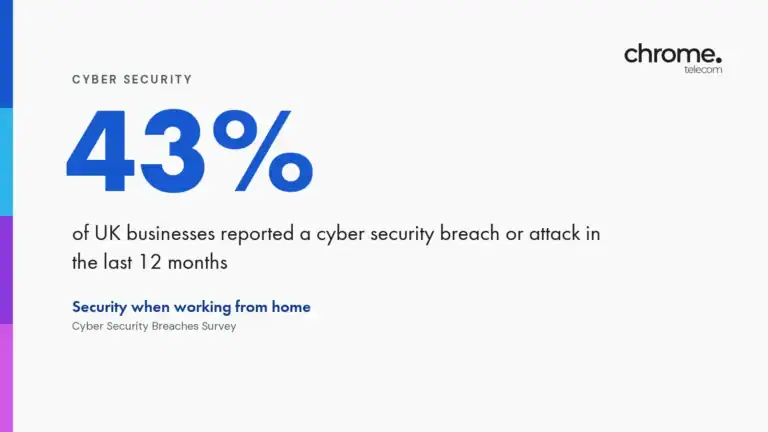
Government figures give a useful sense of how common this stuff is, and where the gaps sit.
Two things stand out. VPN use is going up, not down, so reports of the VPN’s death are early. And more than half of UK businesses still have no second check at sign-in, which matters more than the choice between a VPN and ZTNA. All three figures come from the government’s Cyber Security Breaches Survey 2025/2026.
What a business VPN actually does
VPN stands for virtual private network. It creates an encrypted tunnel between two points, so traffic passing between them can’t easily be read on the way.
You’ll come across two shapes:
- Site-to-site. A permanent link between two buildings, usually between a device in each one. Staff don’t need to do anything. The two networks behave as one.
- Remote access. A person connects from a laptop or phone by opening a client and signing in. Once connected, they’re treated much as if they were sitting at a desk in the office.
Both are mature, well understood and widely used. Neither is going away.

Where a VPN still earns its place
You have more than one site
If you run two or three buildings, a site-to-site VPN is a sensible way to join them. Staff can reach the same files and printers from any of your offices, and the phone system behaves the same way in each. People move between sites and nothing changes for them.
Something important still lives on your premises
Plenty of UK businesses still run a server, a database, a design package or a camera system in their own building. Cloud access doesn’t help you reach those. A VPN does.
A customer, insurer or auditor has asked for one
This comes up more often than people expect. Some contracts and some cyber insurance questionnaires name a VPN specifically. If yours does, read the wording carefully before you offer an alternative. The requirement is sometimes about the words rather than the outcome.
Where a VPN struggles
Three things tend to catch businesses out.
The first is how much access it gives. A remote access VPN usually connects someone to the network rather than to a single application. If a person signs in, they can often reach a great deal more than the one system they needed. If somebody else gets hold of their password, so can they.
The second is housekeeping. VPN access is easy to grant and easy to forget about. It’s common to find accounts still working months after someone has left, and devices connecting that nobody recognises.
The third is the box itself. A VPN device sits on the edge of your network, facing the internet, which makes it worth attacking. The NCSC has issued alerts on this repeatedly, covering Fortinet firewalls and SSL VPN gateways in June 2026, Citrix NetScaler Gateway in April 2026, and Ivanti Connect Secure before that. None of that makes a VPN a bad idea. It makes patching one a job with a deadline.
Neither the access question nor the housekeeping is a reason to rip a working VPN out. They’re reasons to know what yours is doing.
Zero trust network access, in plain English
ZTNA starts from a different place. Rather than letting someone onto the network and then limiting what they can reach, it gives them one named application at a time.
Every request gets checked. Who is this? Is this a company device? Is it up to date? Does this person need this application today?
In practice that means:
- Someone in finance gets the finance system, and nothing else
- A contractor gets the one tool they were brought in to use, for as long as the job lasts
- A laptop that has fallen behind on updates can be asked to update before it connects
ZTNA takes more setting up than a VPN, and it costs more to run. It works best when your user accounts and applications are already in reasonable order.
VPN and ZTNA side by side
Neither column is the winner. They answer different questions.
| Feature | Business VPN | Zero trust network access |
|---|---|---|
| What it connects you to | Your network | One named application at a time |
| When it checks | Mainly at sign-in | At every request |
| What it checks | Username and password, and MFA if you’ve turned it on | Who the person is, what device they’re on, and whether it’s up to date |
| Where it runs | A device in your building, or a hosted equivalent | A service that sits in front of each application |
| Best at | Joining sites, and reaching equipment you own | Giving named people access to named applications |
| Setting it up | Quicker | Slower, and it needs your user accounts in order first |
| Ongoing cost | Lower | Higher |
| Your main job afterwards | Patching the device and tidying old accounts | Keeping the list of people and applications accurate |
VPN or ZTNA? A simple way to decide
Work through it job by job rather than trying to pick one winner.
- Joining two or more offices together. A site-to-site VPN.
- Reaching a server, phone system or camera in your building. A VPN.
- Giving staff access to cloud applications from anywhere. Often neither. Good sign-in controls on the applications themselves will do more.
- Giving a contractor short-term access to one system. ZTNA.
- Meeting a specific contract requirement. Check the wording first.
If you have a mix of cloud services and equipment on site, which most businesses do, you’ll probably want a mix.

The things that matter more than the label
Whichever route you take, these make more difference than the name of the technology on the invoice.
- Multi-factor authentication. This adds a second check when someone signs in, so a stolen password on its own isn’t enough. Turn it on everywhere it’s offered, including on the VPN itself.
- A joiners and leavers process. Access granted on the first day, removed on the last. Write it down and review it every quarter.
- Updates. Anything facing the internet needs patches applied promptly, and that very much includes your VPN device. Weaknesses in these devices are well publicised once they’re found.
- Least privilege. People should have the access their job needs, not the access their job title suggests.
- Knowing what you have. You can’t look after a connection you’ve forgotten about.
Our cyber security awareness training covers the sign-in side of this with your team. Cyber Essentials sets a baseline for most of the rest.
What Cyber Essentials expects if people work from home
This catches people out, so it’s worth being specific.
Multi-factor authentication is now required on every cloud service where it’s available. If it’s offered and you haven’t turned it on, the assessment fails. Cloud services can’t be left out of scope either.
Home working changes what gets assessed. If you give a home worker a router, that router comes into scope. If they connect over your corporate VPN instead, the boundary moves to your company firewall, and their home router drops out.
That’s a genuine reason some businesses keep a VPN. It’s also a reason to check the wording with your assessor before you change how remote access works.
How Chrome does it
We offer two ways to run a business VPN, and we’ll happily tell you if you need neither.
- An on-site VPN appliance. A device in your building. It suits businesses connecting several of their own locations, or reaching equipment that has to stay on the premises.
- Chrome Cloud VPN. A dedicated hosted option, useful when most of what people need is already in the cloud and you’d rather not look after another box.
Either way, we’ll set the access and filtering rules with you, connect and test each location, then look after it afterwards. That includes keeping the device patched, which is the part most easily forgotten. It sits alongside our cyber security services and our managed IT support, so there’s one team to call when something needs sorting.
A sensible place to start
Start with a list rather than a product. Who connects from outside the office, what do they reach when they do, and whose device are they using?
Most businesses have never written that down, and the answer is usually longer than expected. Once you have it, the choice between a VPN, ZTNA or better sign-in controls tends to make itself.
Common questions
What's the difference between a VPN and zero trust network access?
A VPN connects someone to your network, then relies on other controls to limit what they can reach. ZTNA connects someone to one named application and checks the person and their device at every request. A VPN is usually the better fit for joining sites and reaching your own equipment. ZTNA suits giving specific people access to specific applications.
What does ZTNA stand for?
Zero trust network access. The name describes the principle behind it, which is that no request is trusted just because it came from inside the network or from someone who signed in earlier. Each request gets checked on its own.
Is a business VPN still worth having in 2026?
For many businesses, yes. VPN use among UK businesses rose from 31% to 36% in the last year. If you have more than one site, or equipment that has to stay on your premises, a VPN is still the sensible way to reach it. What’s changed is that a VPN on its own is no longer treated as the whole answer for remote access.
Do I need a VPN if everything we use is in Microsoft 365?
Often not. If your files, email and applications are all cloud services, sign-in controls on those services will do more for you than a tunnel back to an office. Multi-factor authentication and conditional access are the things worth spending time on. A VPN earns its place once you have something on site to reach.
How should I give a contractor secure remote access?
Give them the one system they need, for the length of the job, and take it away at the end. ZTNA does this neatly. If you only have a VPN, create a separate account with limited access rather than sharing an existing one, put a date in the diary to remove it, and turn on multi-factor authentication.
Does Cyber Essentials require a VPN?
No. Cyber Essentials doesn’t require a VPN, but using one changes what gets assessed. If home workers connect over a corporate VPN, your internet boundary is the company firewall rather than their home router. What Cyber Essentials does require is multi-factor authentication on cloud services wherever it’s available.
Is a VPN enough to keep remote workers safe?
On its own, no. A VPN protects traffic in transit and gets people to systems they can’t otherwise reach. It doesn’t check whose device is connecting or whether that device is up to date, and it won’t stop a stolen password being used. Multi-factor authentication, a joiners and leavers process and prompt patching do more of that work.
Related reading
Talk it through with someone
If you’d like a hand with that list, we can review your current setup and talk you through the options. Get in touch and we’ll arrange a chat.
Sources and notes
Breach, VPN and two-factor authentication figures are from the Cyber Security Breaches Survey 2025/2026, published on GOV.UK by DSIT and the Home Office. VPN device alerts are from NCSC advisories covering Fortinet firewalls and SSL VPN gateways in June 2026, Citrix NetScaler ADC and Gateway in April 2026, and Ivanti Connect Secure. Cyber Essentials requirements reflect the April 2026 scheme update published by IASME.
We’re describing how these technologies generally work and what the published guidance says. We’re not claiming that a VPN or ZTNA will stop every attack, and the right answer depends on your sites, systems and contracts. If a certification or contract requirement is involved, check the wording with your assessor before you change anything.