Most businesses already own pieces of unified communications. A phone system, a few mobiles, Microsoft Teams or Zoom for meetings, voicemail, email.
What they often don’t have is those pieces working together as one. Calls can be missed, land on a desk phone nobody is sitting at, messages go to three places, and the person who could help is on a video call in another app.
Unified communications brings your business calls, messaging and meetings together, helping your team stay in touch whether they’re in the office, working from home or out visiting customers.
In this guide, we’ll explain what unified communications means, how it works, what it costs and whether it’s right for your business.
The short answer
Unified communications, or UC, means your calls, voicemail, messaging and video meetings run on one system that your team can reach from any device: a desk phone, a laptop app or a mobile.
UCaaS, unified communications as a service, is the same thing delivered from the cloud. A provider runs it for you and you pay per user each month, with no phone system hardware in the office.
For most UK small and medium businesses, a modern cloud phone system is UCaaS. The important thing is choosing the features your team will actually use.
What unified communications actually covers
Unified communications covers several tools that help your team stay in touch. In practice it covers six things.
- Calling. Desk phones, a desktop or browser app, and a mobile app, all on the same business number and extension.
- Call handling. Menus, queues, hunt groups and opening-hours routing, so calls reach the right person or team.
- Voicemail. Delivered to email, and on some plans transcribed, so a missed call doesn’t sit unheard on a handset.
- Messaging and presence. Chat between colleagues, and a status that shows who is free, busy or on a call.
- Meetings. Audio conferencing and video meetings started from the same app.
- Connections to other tools. Your CRM, Microsoft Teams and reporting, so calls show up where your team already works.
Not every business needs all six. A five-person office might only care about the first three. A sales team will care a lot about the last one.
At Chrome Telecom, we help businesses bring their phone systems, mobiles and everyday communication tools together. We take the time to understand how your team works before recommending a setup, and we’re here to support you after installation too.

UC, UCaaS and UCC: the terms explained
Unified communications (UC) is the idea: one system for the different ways people talk to each other and to customers.
UCaaS is how most businesses buy it now. The system lives in a provider’s data centres, updates arrive without anyone visiting, and adding a user is a change to your subscription rather than a new line and an engineer.
On-premises UC is the older route, where the phone system runs on hardware you own. Cisco Unified Communications Manager is a well-known example in larger organisations. It gives you full control, along with the job of maintaining it.
UCC, unified communications and collaboration, adds shared files and team workspaces. Microsoft Teams is the obvious example, which is where most of the confusion starts.
Why UK businesses are moving to it now
Three things are pushing the change, and none of them is a sales pitch.
The old phone network is being switched off, so every business on traditional lines has to move anyway. More people split their week between home and the office, so a phone that only rings on one desk causes missed calls. And the connections needed to carry good-quality calls over the internet are now available almost everywhere, though it is still worth checking your own postcode.
That combination is why the PSTN switch-off is often the moment a business stops replacing like for like and moves to a unified system instead.
The benefits, and the catches
What gets better
- Your number follows you. Calls reach people at a desk, at home or on a mobile, without sharing personal numbers.
- Fewer missed calls. Queues, hunt groups and presence mean a call goes to someone who is actually free.
- One system to manage. New starters, leavers and changes to opening hours are handled in one place.
- It grows with you. You add or remove users as your team changes, rather than buying for the size you might be in five years.
- You can see what is happening. Call reports show answered and missed calls and how long people waited.
What to watch for
- It depends on your internet connection. A poor internet connection can affect call quality. Check this before you move, not after.
- Power cuts. A digital system needs power and internet. Most businesses forward calls to mobiles automatically when the office goes dark.
- People need to use it. The apps only help if your team signs in to them. A short training session makes more difference than any feature.
- Per-user costs add up. Not everyone needs the full licence. A warehouse handset and a sales manager have very different needs.
What does unified communications look like in a typical business?
Imagine you run a business with 20 employees. Some work in the office, others visit customers, and a few work from home.
Without a unified communications system, calls might ring at empty desks. Colleagues may need to share personal mobile numbers, and customers can end up waiting while someone tracks down the right person.
With unified communications, your team can answer business calls from their desk phones, laptops or mobiles. Calls can be directed to available colleagues, and everyone can keep using the same business numbers.
Your customers have an easier time reaching the right person, and your team can stay connected wherever they’re working.
Separate phone lines compared with unified communications
Where the two differ in day to day use.
| Feature | Phone lines plus separate tools | Unified communications (UCaaS) |
|---|---|---|
| Where it runs | Lines into the building, often a phone system on the wall | The provider’s cloud platform |
| Taking calls away from the office | Forward to a mobile and hope | The same extension on a laptop or mobile app |
| Messaging and meetings | Separate apps, separate logins | In the same app as calls |
| Adding a user | A new line or handset, sometimes an engineer visit | A change to your subscription |
| Changing opening hours or routing | Often a call to your provider | Changed in one place, or by your provider on request |
| Call reporting | Little to none | Answered, missed and waiting times |
| After 31 January 2027 | Analogue and ISDN lines stop working | Unaffected, as it already runs over the internet |
| In a power cut | A basic corded phone may still work | Needs power and internet, so calls forward to mobiles |
| How you pay | Line rental per line, plus each separate tool | Per user per month |
Do you need UC if you already use Microsoft Teams?
Teams is already a strong collaboration tool for chat and meetings, with shared files built in. What it doesn’t do on its own is call landlines and mobiles. Teams only calls other Teams users until it is connected to the public phone network.
So the choice is usually between buying Microsoft’s calling licences, or connecting a phone system to Teams so calls ring in Teams alongside desk phones and mobile apps. Our guide to the Microsoft Teams phone system compares the two, including what Microsoft charges.

What it costs
UCaaS is priced per user per month. What you pay depends on how many people need each level of licence, which calls are included and whether you need extras such as call recording or contact centre tools.
As an example of how the levels split, the standard ChromeX licence covers the everyday essentials. That means inclusive UK calls subject to your package and a UK number, with the ChromeX apps for computers and mobiles. Call handling such as time-of-day routing and hunt groups is included too, along with greetings and on-hold music.
ChromeX Pro+ adds Microsoft Teams calling, CRM connections, multi-level call menus, video meetings, voicemail transcription, 90-day call recording and call queues with wallboard reporting.
You can choose different licences for different roles, so you’re only paying for the features each person needs.
How to move to unified communications
1. List what you have now
Every number, every line, every handset and the end date of each contract. Include anything else that dials out over a phone line, such as an alarm or a lift phone.
2. Check your connection
Calls over the internet need a steady connection. If your office is on older copper business broadband, look at the options first.
3. Decide who needs what
Group people by how they work: reception, sales, field staff, managers. That tells you which licence each person needs and which devices.
4. Move your numbers and train your team
Your existing numbers can almost always come with you. Pick a switchover date, then give people a short session on the apps and features they will use.
How Chrome does it
ChromeX, our cloud phone system, brings desk phones and the ChromeX apps together with Microsoft Teams and call management on one system. We plan the move, set it up around the way your business works, train your team and stay available afterwards.
Because we also look after connectivity, business mobiles and Microsoft 365, there is one team to call when something needs sorting. You can see the full list of phone system features and how ChromeX connects with your CRM and Teams.
A sensible place to start
Count the people who take calls, note where they work from, and find the end date of your current phone contract.
With those three things you can see which parts of unified communications your business would actually use, and we can tell you what it would cost.
Common questions
What is unified communications in simple terms?
It means your phone calls, voicemail, messaging and video meetings all run on one system, and your team can use it from a desk phone, a computer or a mobile. Instead of several separate tools, people have one app and one business number that follows them.
What is the difference between UC and UCaaS?
UC is the idea of bringing your communication tools together. UCaaS, unified communications as a service, is a way of buying it: a provider runs the system in the cloud and you pay per user each month, rather than owning phone system hardware.
What does UCC mean?
Unified communications and collaboration. It adds shared files and team workspaces on top of calling and meetings. Microsoft Teams is the best-known example.
Is unified communications the same as VoIP?
Not quite. VoIP, voice over internet protocol, is the technology that carries calls over the internet. Unified communications uses VoIP for its calls, then adds messaging, meetings, voicemail and connections to other tools on top.
Is Microsoft Teams a unified communications platform?
It handles chat and meetings well, with shared files built in. To call landlines and mobiles it needs either Microsoft’s calling licences or a phone system connected to it, which is how many businesses use ChromeX alongside Teams.
Can we keep our existing phone numbers?
Almost always. Numbers move to the new system by porting, including local numbers customers have had for years. We agree a switchover date so calls keep coming in throughout.
What happens to calls if the internet or power goes down?
The phones in the office stop, because they need both. Most businesses set calls to forward to mobiles automatically, and the mobile and laptop apps keep working anywhere else with a connection. If losing calls for an hour would be a serious problem, a backup connection is worth discussing.
Related reading
Talk it through with someone
Every business handles calls differently. The right setup depends on how your team works, the tools you already use and what you want to improve.
At Chrome, we’ll review your current phone system, explain the options and help you understand what makes sense for your business.
You’ll get clear advice, straightforward pricing and support from a team that takes the time to understand your needs.
Speak to our team to talk through your options.
Sources and notes
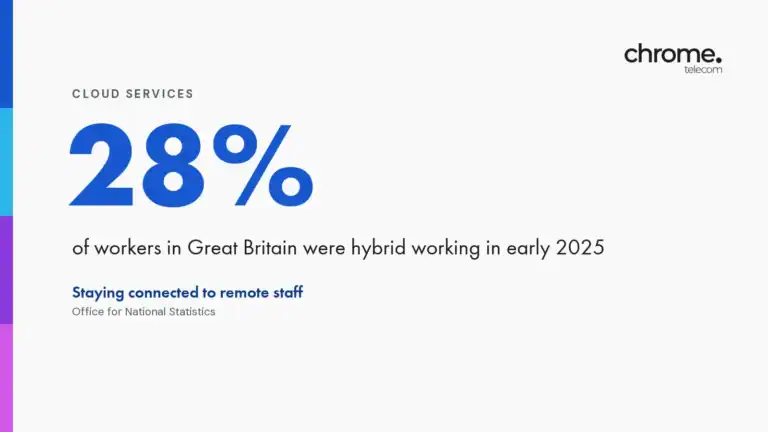
The 31 January 2027 date is published by Openreach. The hybrid working figure is from the Office for National Statistics, Who has access to hybrid working in Great Britain?, covering 8 January to 30 March 2025. The gigabit figure is from Ofcom’s Connected Nations Spring 2026 update and counts premises, not businesses.
ChromeX features are as described on our business phone systems page. What each user’s licence includes depends on your package, and we confirm licences and costs before you commit.