
| Yealink AX86R | Yealink W59R | Yealink T74W | |
|---|---|---|---|
| Type | Rugged Wi-Fi handset | Rugged DECT handset | Desk phone |
| Best for | Mobile staff on sites with good Wi-Fi | Tough sites and care settings | Everyday desk users |
| Connects through | Your Wi-Fi access points | A DECT base station | A network cable or Wi-Fi |
| Talk time | Up to 13 hours | Up to 28 hours | Stays plugged in |
| Built for | IP67, 1.8 m drop | IP67, 2.5 m drop | Office use |
| Our guide | You’re reading it | Yealink W59R guide | Yealink T74W guide |
// Handset guide
Yealink AX86R buyer's guide
The rugged Wi-Fi handset. The AX86R is a Wi-Fi VoIP phone for warehouses and care settings: sealed against dust and water to IP67, tested for a 1.8-metre drop and fitted with a red alarm button.
It has no base station. It joins your Wi-Fi like a laptop does, so it’s only as good as the Wi-Fi it uses.
This guide explains who it suits, what your Wi-Fi needs and how it works on ChromeX, our cloud phone system.
Updated 12 November 2026 · 7 minute read · Covers the AX86R
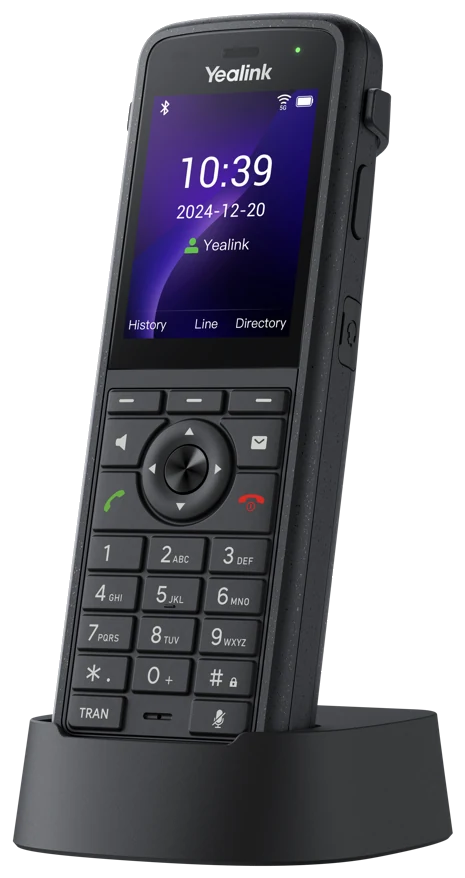
IP67 and a 1.8 m drop
Runs on your Wi-Fi
Set up for you on ChromeX
The short answer
Choose the AX86R for staff who are on their feet all day, on sites with good business Wi-Fi, such as a warehouse or a care home. It gives them a tough handset with push-to-talk, a headset socket and safety alarms, without a separate phone radio system.
The catch is the Wi-Fi. Calls need a strong signal everywhere people walk, and access points that hand calls over quickly. Not sure yours is up to it? We can survey your site first. If the Wi-Fi isn’t there yet, a DECT handset such as the W59R is the safer choice.
Staff who sit at a desk are better served by a desk phone such as the T74W.
IP67
Sealed against dust, and survives being dropped in water up to a metre deep for half an hour
1.8 m
Drop height Yealink tests it to, with an antibacterial case that copes with cleaning
13 hours
Talk time on a charge, or up to 300 hours on standby
AX86R or W59R?
Both are rugged IP67 handsets with the same four safety alarms. The difference is how they connect: the AX86R uses your Wi-Fi, and the W59R uses its own DECT base station.
AX86R
On your Wi-Fi
- No base station: it joins your access points
- Push-to-talk, a headset socket and a 2.4-inch screen
- Up to 13 hours’ talk time
Best for: sites with good business Wi-Fi that reaches everywhere staff work
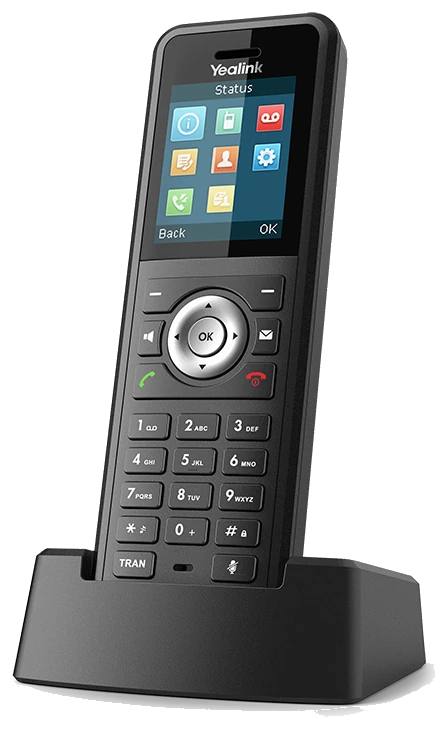
W59R
On a DECT base
- Its own radio system, separate from your Wi-Fi
- Up to 28 hours’ talk time
- Tested for a 2.5-metre drop
Best for: sites where the Wi-Fi is patchy, or long shifts away from a charger
A closer look at the AX86R
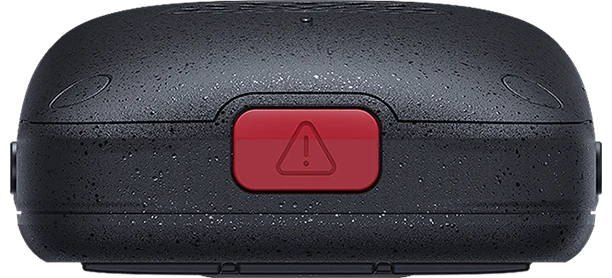
A red alarm button. Hold it for three seconds to call for help. The handset can also raise an alarm if it falls, stops moving or detects running.

Made for people on the move. A belt clip, a proximity sensor and a vibrate alert, so calls aren’t missed on a busy floor.
Who the AX86R suits
The AX86R is for people whose work keeps them moving, on sites with good Wi-Fi. These are the places it earns its keep.
Warehouses and logistics
Push-to-talk reaches a whole team at once, and the handset is tested for drops of up to 1.8 metres.
Retail and hospitality
Staff on the shop floor or around a hotel answer calls and talk to each other without walking back to a desk.
Care homes
An antibacterial case that copes with cleaning, and alarms that call for help if a carer falls or presses the button.
When a different phone makes more sense
Not everyone needs a rugged Wi-Fi handset. Here’s how the AX86R compares with the W59R and the T74W desk phone.
Wi-Fi handsets need business access points with fast roaming. A DECT handset uses its own base stations instead.
What the features mean day to day
A datasheet lists dozens of features. These are the ones your team will notice.
Sealed and tough
IP67 means no dust gets in and it survives being dropped in water. Yealink tests it for drops of up to 1.8 metres.
Four safety alarms
The red button, a fall, no movement or running can set off a call to a number you choose. Each one warns first, so a false alarm can be cancelled.
Push-to-talk
A dedicated key turns the handsets into walkie-talkies, in up to 10 groups, over your site's network.
Clear calls in noisy places
Two microphones and noise cancellation cut background noise on your side of the call.
Headsets your way
Bluetooth 5.0 for wireless headsets, plus a 3.5 mm socket for a wired one.
A battery that lasts a shift
Up to 13 hours' talk time. The battery is removable, and the handset charges in its cradle or by USB-C.
How the AX86R works with ChromeX
ChromeX is Chrome’s cloud phone system. The AX86R connects to it over your Wi-Fi, so each handset works like any other extension.
1
We check your Wi-Fi
If you're not sure it's ready, a Wi-Fi site survey shows whether the signal reaches everywhere your team works.
2
We add the handsets to your account
We register each handset on ChromeX and give it its own extension or number.
3
Each handset joins your Wi-Fi
One set-up handset can share the Wi-Fi details with the rest. Each then collects its number and phone book from ChromeX.
4
Changes happen remotely
Need a new user or a change to the phone book? We change it in ChromeX and the handsets update.
Planning to use the safety alarms or push-to-talk? They’re set up handset by handset, so tell us before you order and we’ll test them with you on your Wi-Fi.
Check these before you order
Wi-Fi coverage. Calls need a strong signal (-67 dBm or better) everywhere staff walk, with neighbouring access points overlapping. Metal racking, shutters and concrete weaken the signal. Our Wi-Fi site survey shows where coverage falls short before you order.
Fast roaming. Your access points need 802.11r switched on, and they should all run as one system with the same network name, so calls hand over as people walk.
Business access points. Yealink tests the AX86R with business access points, including UniFi. Broadband routers and home mesh systems aren’t on its list.
A staff network for phones. Put the handsets on their own staff Wi-Fi with voice traffic given priority, not on the guest network.
Temperature. The AX86R is rated for 0 to 40 °C, so it isn’t designed for freezers or cold stores below zero.
Safety alarms. The alarms are off until they’re set up. If your team will rely on them, tell us before you order so we can check how they’ll work with your setup and test them with you.
Your internet connection. Every call uses your broadband. If you’re adding a lot of handsets, we can check your business internet has room for them.
Yealink AX86R specifications
| Screen | 2.4-inch 240 x 320 colour screen |
|---|---|
| Dust and water | IP67 |
| Drop | Up to 1.8 m |
| Case | Antibacterial, resistant to cleaning chemicals |
| Wi-Fi | Dual-band Wi-Fi 6 (2.4 and 5 GHz), 802.11k/v/r fast roaming |
| Wi-Fi security | WPA2, WPA3 and 802.1X enterprise sign-in |
| Bluetooth | Bluetooth 5.0 for headsets |
| Wired headset | 3.5 mm socket |
| Battery | 3,100 mAh rechargeable lithium-ion, removable |
| Talk time | Up to 13 hours, in Yealink’s tests |
| Standby | Up to 300 hours |
| Charging | Charging cradle (supplied), or USB-C |
| Safety alarms | Red alarm button, man down, no movement and running |
| Push-to-talk | Dedicated key, up to 10 groups on the local network |
| Calls | Up to 4 SIP accounts, 5-way conference calls, HD audio (G.722) |
| Audio | Dual noise-cancelling microphones, full-duplex speakerphone, hearing aid compatible |
| Size and weight | 160.1 x 55.3 x 25.85 mm, 218 g |
| Working temperature | 0 to 40 °C |
| In the box | Handset, charging cradle, battery, belt clip, power adapter, quick start guide |
From Yealink's AX86R datasheet (August 2026) and product page. Yealink can change details between production runs, so we'll confirm the specification before you order.
Common questions
Does the Yealink AX86R need a base station?
No. It connects straight to your Wi-Fi access points, like a laptop. There’s no extra radio system to install, but your Wi-Fi has to be good enough for calls everywhere staff use it.
What does my Wi-Fi need for the AX86R?
Yealink asks for a signal of -67 dBm or better everywhere the handsets are used, access points that overlap so calls can hand over, and 802.11r fast roaming switched on. Voice traffic should be given priority, and the handsets should sit on a staff network, not guest Wi-Fi. If you’re not sure your Wi-Fi meets that, we can survey your site first.
Should I choose the AX86R or the W59R?
Choose the AX86R if your site has good business Wi-Fi and you want push-to-talk, a headset socket and a bigger screen. Choose the W59R, which runs on its own DECT base stations, if your Wi-Fi is patchy or your team needs the longest talk time: up to 28 hours against 13.
What's the difference between the AX86R and the AX83H?
The AX83H is Yealink’s slimmer office Wi-Fi handset. It isn’t rated against dust, water or drops, its battery gives up to 9 hours’ talk, and it has the alarm button only. The AX86R is the rugged one, with all four alarms and a push-to-talk key.
How long does the AX86R battery last?
Up to 13 hours of talk time, or 300 hours on standby, in Yealink’s tests. The battery is removable, and the handset charges in its cradle or by USB-C.
How do the AX86R safety alarms work?
Holding the red button for three seconds, a fall, no movement or running can set off an alarm. The handset warns first, so a false alarm can be cancelled, then calls a number you choose. The alarms are off until they’re set up, so talk to us before your team relies on them.
Does push-to-talk work between sites?
Push-to-talk works between handsets on the same site network. Reaching another site depends on how your network is set up, so ask us first. Ordinary calls between sites work as normal extensions on ChromeX.
Can the AX86R be cleaned with disinfectant?
Yes. Yealink says the case is antibacterial and resistant to cleaning chemicals. If you use strong cleaning products, check them with us first.
On this page
AX86R at a glance
Screen
2.4-inch colour
Rating
IP67, 1.8 m drop
Talk time
Up to 13 hours
Alarms
Four types
Push-to-talk
Yes, 10 groups
Connects
Wi-Fi 6
Phone system
ChromeX
// Hardware guides
More hardware guides
Compare the other phones and adapters we set up on ChromeX.
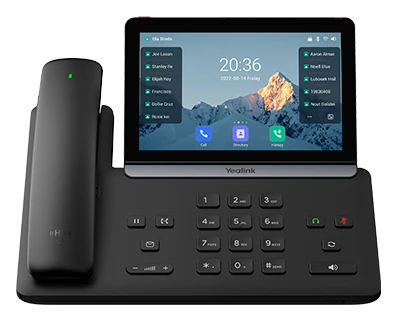
Not sure which phone suits each person?
Tell us how your team works and where. We’ll check your Wi-Fi with a site survey if needed, suggest the right handset for each person, then set everything up on ChromeX for you.