
| Yealink T74W | Yealink T77U | Yealink T88 | |
|---|---|---|---|
| Type | Desk phone | Touchscreen desk phone | Android touchscreen desk phone |
| Best for | Everyday desk users | Reception and busy desks on a cable | Reception, team leaders and senior staff |
| Screen | 4.3-inch colour | 7-inch 800 x 480 touchscreen | 7-inch 1024 x 600 touchscreen |
| Line keys | 50, 10 to a page | 84, 12 to a page | 84, 12 to a page |
| Wi-Fi and Bluetooth | Built in | Through USB adapters | Built in |
| Going cordless | Not available | Not available | BTH88 handset, up to 10 m |
| Takes over from | T46U | T48U | T58W and T58V |
| Our guide | Yealink T74W guide | You’re reading it | Yealink T88 guide |
// Handset guide
Yealink T77U buyer's guide
The touchscreen desk phone for wired desks. The T77U is a VoIP desk phone, so your calls run over the internet rather than a phone line.
It has a 7-inch touchscreen and 84 line keys, and it takes over from the Yealink T48U.
This guide explains who it suits, how it compares with the T88 and how it works on ChromeX, our cloud phone system.
Updated 2 November 2026 · 7 minute read · Covers the T77U
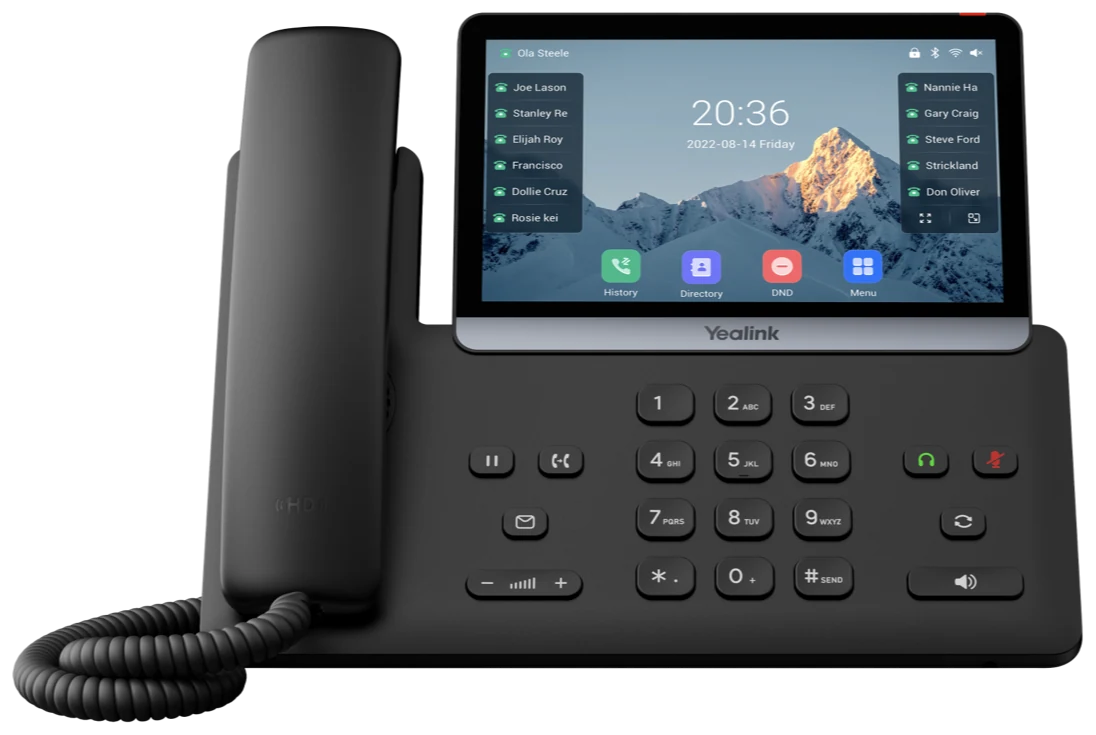
7-inch touchscreen
84 line keys
Set up for you on ChromeX
The short answer
Choose the T77U for reception and busy desks where people want a large touchscreen and plenty of line keys, and every desk has a network cable.
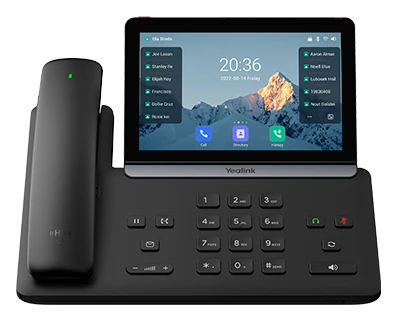
It’s the natural next step from the Yealink T48U. If someone needs Wi-Fi, Bluetooth or a cordless handset built in, the T88 is the better fit.
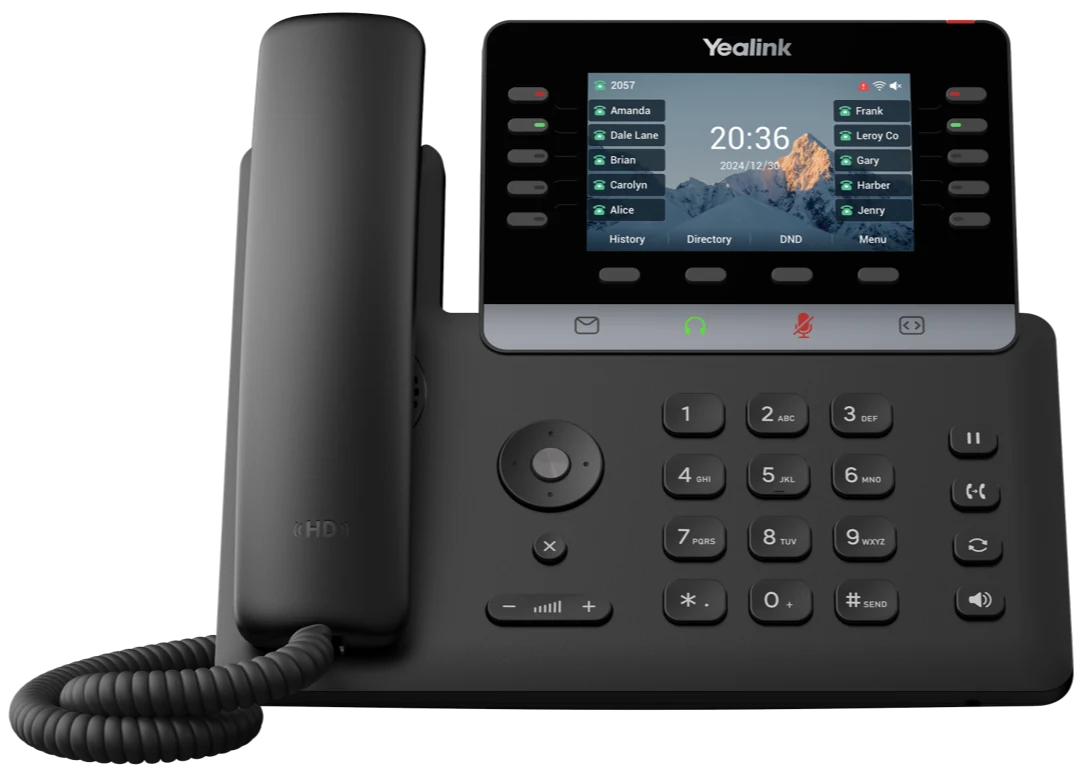
For everyday desks that don’t need a touchscreen, the T74W does the job.
7-inch
Touchscreen with light and dark themes, on a stand with two viewing angles
84
Line keys on the touchscreen, 12 to a page
2
USB ports, one USB-A and one USB-C, for headsets and adapters
T77U or T88: which touchscreen phone?
Both have a 7-inch touchscreen and 84 line keys, and they’re the two touchscreen phones our guides cover. Yealink lists this one as the SIP-T77U. The difference is what’s built in.
T77U
Wired touchscreen
- 7-inch 800 x 480 touchscreen with 84 line keys
- Wi-Fi and Bluetooth through Yealink USB adapters
- Two USB ports, USB-A and USB-C
Best for: reception and busy desks on a network cable
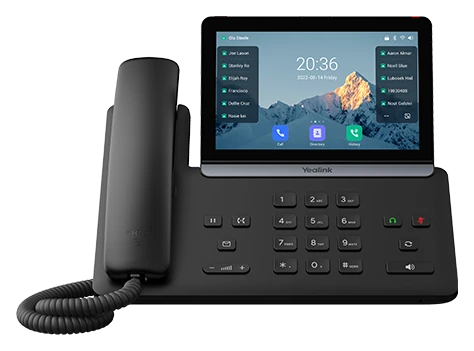
T88W
Wireless built in
- Sharper 7-inch 1024 x 600 screen running Android 13
- Wi-Fi 6 and Bluetooth 5.0 built in
- BTH88 cordless handset as an option
Best for: senior staff and anyone who wants a cordless handset
A closer look at the T77U
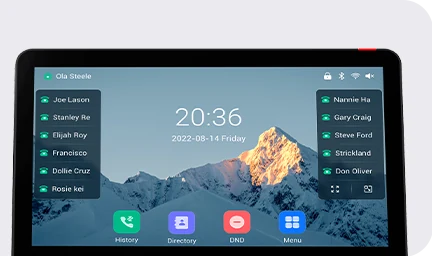
Touchscreen line keys. The 7-inch touchscreen shows 12 line keys at a time, with 84 across seven pages.
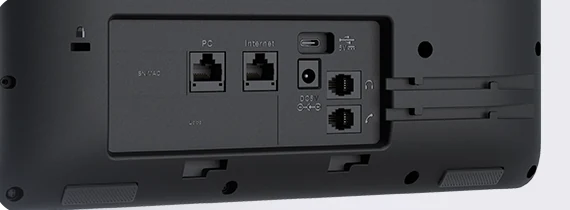
USB-A and USB-C. Two USB ports take a USB headset, a Wi-Fi or Bluetooth adapter, or an expansion module.
Who the T77U suits
The T77U is for people who handle a lot of calls from one desk and want a large touchscreen to do it. These are the roles where it fits best.
Reception and front desk
A large touchscreen with 84 line keys shows who's free at a glance, and expansion modules add more for big teams.
Team leaders and supervisors
Keep an eye on your team's lines and step in when a call is waiting, with 10-way conference calls from the phone.
Desks with a network cable
If every desk has a network point and people use wired or USB headsets, you don't need wireless built in.
When a different phone makes more sense
Here’s how the T77U compares with the T74W and the T88, the other desk phones our guides cover.
Figures from Yealink's datasheet for each model.
What the features mean day to day
A specification sheet lists dozens of features. These are the ones your team will notice.
A large touchscreen
The 7-inch touchscreen has light and dark themes and an accessibility mode, and the stand sets it at one of two angles.
See who's free before you transfer
A line key can show whether a colleague is free, on a call or ringing. One press picks up their call. This is called busy lamp field (BLF).
Clearer calls in a busy office
Yealink's Acoustic Shield and noise filtering reduce background noise on your side. The 3 W speaker is loud enough for hands-free calls, and the handset works with hearing aids.
Headsets your way
Plug in a wired or USB headset, or a wireless headset adapter. For a Bluetooth headset, add Yealink's BT51 USB adapter.
Wi-Fi when you need it
There's no Wi-Fi built in, but Yealink's WF50 USB adapter adds it for desks without a network point. On a cable, the second gigabit port lets a computer share it.
Room to grow at reception
Add up to three EXP55 expansion modules, each with a colour screen and 78 keys.
How the T77U works with ChromeX
ChromeX is Chrome’s cloud phone system, and the T77U is one of the Yealink phones it sets up automatically. Most of the work happens before the phone reaches your desk.
1
We add the phone to your account
We link each phone to the person who'll use it, with their number, line keys and phone book.
2
You plug it in
One network cable is enough if your network switch supplies power. Otherwise, use the optional power supply.
3
It picks up its settings
On first start-up the phone finds ChromeX and downloads its settings. If it needs a firmware update first, we'll sort it.
4
Changes happen remotely
Need a new line key or a colleague added to the phone book? We change it in ChromeX and the phone updates.
Moving from the Yealink T48U? The T77U takes over from it, with the same size touchscreen and nearly three times as many line keys.
Check these before you order
Power. The T77U can take its power through the network cable, using power over Ethernet (PoE). It doesn’t come with a power supply, so if your network switch doesn’t provide PoE, order the optional power supply with each phone.
Cabling. The phone has two gigabit network ports, so a computer can share the desk’s single network point.
Wi-Fi and Bluetooth. Neither is built in. If a desk needs them, order Yealink’s WF50 Wi-Fi or BT51 Bluetooth USB adapter with the phone.
USB ports. There are two, so a desk can use two of these at once: a USB headset, a Wi-Fi adapter, a Bluetooth adapter or call recording. Plan what each desk needs.
Expansion modules. One EXP55 runs from the phone. Two or three need their own Yealink power supply.
Wall mounting. The T77U can go on a wall, but the bracket is sold separately. Ask for it with the phones.
Your internet connection. Every call uses your broadband. If you’re adding a lot of phones, we can check your business internet has room for them.
Yealink T77U specifications
| Screen | 7-inch 800 x 480 colour touchscreen, light and dark themes |
|---|---|
| Stand | Two viewing angles |
| Line keys | 84 on the touchscreen, 12 to a page (Yealink calls them DSS keys) |
| SIP accounts | Up to 16, so one phone can carry several numbers or lines |
| Conference calls | Up to 10 people, hosted from the phone |
| Audio | HD voice, Acoustic Shield, noise filtering, 3 W speaker, full-duplex speakerphone, hearing aid compatible handset |
| Wireless | None built in. Wi-Fi through the WF50 USB adapter, Bluetooth through the BT51 USB adapter |
| Network | Two gigabit Ethernet ports |
| Power | Power over Ethernet (IEEE 802.3af, class 3) or an optional power supply |
| USB | Two USB 2.0 ports, USB-A and USB-C, for headsets, adapters, call recording or an expansion module |
| Headset socket | RJ9 socket for a wired headset; works with the EHS40 wireless headset adapter |
| Expansion | Up to three EXP55 colour-screen modules, 78 keys each |
| Security | Secure boot, hardware encryption (Yealink’s trusted execution environment), encrypted firmware and settings, encrypted calls (TLS 1.3 and SRTP) |
| Mounting | Desk stand included, wall mountable with an optional bracket |
| Size | 262.1 x 167.5 x 219.2 x 56.9 mm, as Yealink lists it |
| In the box | Phone, handset and cord, stand, network cable, quick start guide. Power supply and wall bracket sold separately |
From Yealink's T77U datasheet. Yealink can change details between production runs, so we'll confirm the specification before you order.
Common questions
We use the Yealink T48U. Should we move to the T77U?
The T77U is the newer model that takes over from the T48U. It keeps the 7-inch touchscreen and adds nearly three times as many line keys, a USB-C port and newer security. Older T48G phones can no longer use Yealink’s zero-touch setup service, so they’re the first to replace. We can check your current models and suggest an order to replace them in.
Does the Yealink T77U have Wi-Fi or Bluetooth?
Not built in. You can add Wi-Fi with Yealink’s WF50 USB adapter and Bluetooth with the BT51. If you want both built in, look at the T74W or the T88.
What's the difference between the T77U and the T88?
Both have a 7-inch touchscreen and 84 line keys. The T88 adds a sharper screen running Android 13, built-in Wi-Fi and Bluetooth, and the option of a cordless handset. The T77U suits desks that are happy on a cable.
Is there a Yealink T77W?
No. The T77U is the only version. Yealink’s touchscreen phones with Wi-Fi built in sit in its T8 range, such as the T88.
Does the T77U work with Microsoft Teams?
The T77U is an IP phone that uses SIP, the standard most cloud phone systems use. It doesn’t run the Teams app. If your team takes calls in Teams, ChromeX can connect to it. We’ll suggest the right mix of desk phones and Teams for your business.
Does the T77U come with a power supply?
No. It’s built to take power through the network cable, using power over Ethernet (PoE), so one cable carries both power and data. If your network switch doesn’t provide PoE, you’ll need the optional power supply for each phone.
Can I add more buttons for reception?
Yes. The T77U takes up to three EXP55 expansion modules. Each has a colour screen and 78 keys for colleagues, departments or shared lines.
Can the T77U be wall mounted?
Yes, with Yealink’s wall bracket, which is sold separately. A small tab in the cradle turns round so the handset stays put on the wall.
On this page
T77U at a glance
Screen
7-inch touchscreen
Line keys
84 (12 per page)
SIP accounts
Up to 16
Wireless
Through USB adapters
Expansion
Up to 3 EXP55
Power
PoE or power supply
Phone system
ChromeX
// Hardware guides
More hardware guides
Compare the other phones and adapters we set up on ChromeX.
Not sure which phone suits each desk?
Tell us how your team works. We’ll suggest the right handset for each person, then set everything up on ChromeX for you.